
Gaming Computers vs Workstations: Key Differences
Introduction
The debate between gaming computers and workstations has become more relevant than ever. Both systems deliver high performance, advanced hardware, and premium features, but they are designed for very different purposes. At first glance, a gaming PC and a workstation may appear nearly identical because they often share similar processors, memory configurations, and graphics technology. However, the real difference lies in how each machine is optimized, tested, and used in real-world environments.
Gaming computers are built to deliver immersive entertainment experiences with high frame rates, responsive graphics, and smooth gameplay. Workstations, on the other hand, are engineered for professional workloads such as 3D rendering, CAD design, scientific simulations, video editing, machine learning, and software development.
Understanding the differences between these systems is essential before making a purchase. Choosing the wrong type of machine can lead to unnecessary expenses or performance limitations. This guide explains the key distinctions between gaming computers and workstations, including hardware, performance, reliability, cost, upgrade potential, and ideal use cases.
What Is a Gaming Computer?
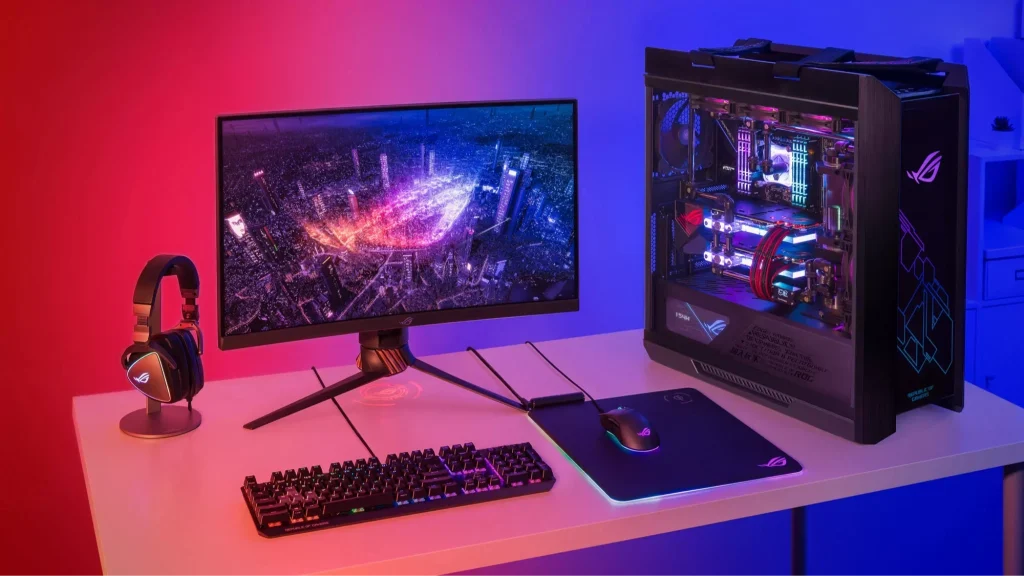
A gaming computer is a high-performance desktop or laptop designed specifically for playing video games. These systems prioritize graphical power, fast response times, and efficient cooling to handle demanding modern titles.
Gaming PCs are commonly used for:
- AAA gaming titles
- Competitive esports
- Virtual reality gaming
- Live streaming
- Content creation for social platforms
- Casual video editing and graphic design
Most gaming systems feature consumer-grade hardware that focuses on maximizing frame rates and visual quality.
Common Features of Gaming PCs
- High-refresh-rate graphics cards
- RGB lighting and custom aesthetics
- Fast SSD storage
- Advanced cooling systems
- Overclocking support
- High-speed RAM optimized for gaming performance
Gaming systems are designed to balance cost and performance while delivering the best possible gaming experience.
What Is a Workstation?
A workstation is a professional-grade computer built for specialized applications that require maximum stability, reliability, and computational power. Unlike gaming PCs, workstations are optimized for productivity rather than entertainment.
These systems are commonly used in industries such as:
- Architecture
- Engineering
- Film production
- Scientific research
- Artificial intelligence
- Financial modeling
- Software development
- Medical imaging
Workstations are designed to run professional software continuously under heavy workloads without crashing or producing errors.
Common Features of Workstations
- Enterprise-grade processors
- Error-correcting memory
- Professional GPUs
- Certified hardware drivers
- Enhanced reliability testing
- Large memory capacity
- Superior multitasking performance
Workstations focus on precision and long-term stability instead of maximizing gaming visuals.
Core Hardware Differences
Processor Differences
The processor is one of the biggest differences between gaming PCs and workstations.
Gaming Processors
Gaming computers typically use processors optimized for high clock speeds and strong single-core performance. Modern games rely heavily on fast individual cores rather than extremely high core counts.
Popular gaming CPUs include:
- Intel Core i7 and i9 series
- AMD Ryzen 7 and Ryzen 9 series
These processors excel at:
- High frame rates
- Fast game loading
- Streaming gameplay
- General multitasking
Workstation Processors
Workstations often use CPUs with significantly more cores and threads. Professional applications such as rendering software, simulations, and machine learning platforms can use many cores simultaneously.
Popular workstation CPUs include:
- Intel Xeon processors
- AMD Threadripper Pro
- AMD EPYC processors
These processors prioritize:
- Parallel processing
- Stability under continuous load
- Error management
- Large memory support
In professional workflows, more cores can dramatically reduce rendering and processing times.
Graphics Card Differences
Graphics cards are another major distinction between gaming computers and workstations.
Gaming GPUs
Gaming PCs use consumer graphics cards designed for rendering modern video games with realistic lighting, shadows, and textures.
Popular gaming GPUs include:
- NVIDIA GeForce RTX series
- AMD Radeon RX series
Gaming GPUs focus on:
- High frame rates
- Ray tracing performance
- Real-time rendering
- Gaming optimization
They are ideal for entertainment but may not perform as reliably in professional workloads.
Workstation GPUs
Workstations use professional graphics cards optimized for precision-based tasks and certified software compatibility.
Examples include:
- NVIDIA RTX Professional series
- AMD Radeon Pro series
These GPUs are designed for:
- CAD applications
- 3D modeling
- Engineering simulations
- Scientific visualization
- Professional rendering
Professional GPUs often include certified drivers that ensure compatibility with software such as AutoCAD, SolidWorks, Maya, and Adobe Premiere Pro.
Memory and RAM
Memory configuration differs significantly between the two systems.
Gaming RAM
Gaming systems prioritize speed and responsiveness. Most gaming computers use:
- DDR5 or high-speed DDR4 memory
- 16GB to 32GB RAM
- Low latency configurations
This setup provides excellent gaming performance and smooth multitasking.
Workstation RAM
Workstations focus on reliability and large-scale workloads.
These systems may include:
- ECC memory
- 64GB to 512GB RAM
- Advanced memory management
ECC memory can detect and correct data corruption errors, which is essential for scientific calculations and mission-critical tasks.
Storage Differences
Both gaming PCs and workstations use SSDs for speed, but their storage priorities vary.
Gaming Storage
Gaming systems usually include:
- NVMe SSDs for fast game loading
- Secondary HDDs for large game libraries
- Moderate storage capacity
The primary goal is reducing load times and improving responsiveness.
Workstation Storage
Workstations often require:
- Large-capacity SSD arrays
- RAID configurations
- Enterprise-grade drives
- High-speed data transfer
Professional users frequently work with massive project files that demand reliable and scalable storage solutions.
Performance Comparison
Gaming Performance
Gaming computers are optimized for:
- High FPS gameplay
- Low input lag
- Real-time rendering
- Fast refresh rates
For gamers, a gaming PC typically outperforms a workstation in actual gaming because consumer GPUs are heavily optimized for modern game engines.
Professional Application Performance
Workstations dominate in:
- 3D rendering
- Simulation tasks
- AI processing
- Video editing
- Engineering software
- Large-scale multitasking
Professional software is often optimized specifically for workstation hardware and certified drivers.
Reliability and Stability
Gaming Computer Reliability
Gaming systems are reliable for daily entertainment and moderate workloads. However, they are not always designed for continuous heavy operation.
Some gaming PCs may experience:
- Thermal throttling under long workloads
- Reduced stability during overclocking
- Higher failure risk under nonstop rendering tasks
Gaming systems focus more on speed than enterprise-level reliability.
Workstation Reliability
Workstations undergo extensive validation and testing.
Key reliability advantages include:
- Stable drivers
- ECC memory support
- Certified compatibility
- Reduced crash rates
- Better thermal management
These systems are designed to run demanding software for long periods without interruption.
Cooling and Power Efficiency
Gaming PC Cooling
Gaming computers often feature aggressive cooling systems designed to handle GPU-intensive workloads.
Common cooling solutions include:
- Large air coolers
- Liquid cooling systems
- Multiple RGB fans
- High airflow cases
The emphasis is on maintaining low temperatures during gaming sessions.
Workstation Cooling
Workstations prioritize quiet and efficient operation.
Professional systems typically feature:
- Optimized airflow
- Quiet fan profiles
- Enterprise-grade thermal management
- Stable operating temperatures
Noise reduction is especially important in office and studio environments.
Upgrade Potential
Gaming Computer Upgrades
Gaming PCs are highly customizable.
Users can easily upgrade:
- Graphics cards
- RAM
- Storage drives
- Cooling systems
- Power supplies
This flexibility makes gaming computers popular among enthusiasts.
Workstation Upgrades
Workstations also support upgrades but often use specialized hardware.
Some upgrades may require:
- Certified components
- Enterprise compatibility checks
- Higher investment costs
Despite this, workstations generally offer excellent scalability for professional growth.
Price Differences
Cost of Gaming Computers
Gaming PCs are generally more affordable.
A powerful gaming desktop can often deliver excellent performance at a lower price point than a professional workstation.
Typical gaming PC pricing:
- Entry level: $800 to $1,200
- Mid-range: $1,500 to $2,500
- High-end: $3,000+
Cost of Workstations
Workstations are usually more expensive because of:
- Enterprise hardware
- Certified drivers
- ECC memory
- Professional GPUs
- Extended reliability testing
Professional workstation pricing:
- Entry level: $1,500 to $2,500
- Mid-range: $3,000 to $5,000
- Enterprise systems: $10,000+
The higher cost reflects the need for reliability, precision, and long-term stability.
Which One Should You Choose?
Choose a Gaming Computer If:
A gaming PC is the better option if you:
- Primarily play games
- Stream gameplay online
- Want strong performance for general use
- Need a lower-cost high-performance system
- Enjoy upgrading hardware frequently
- Perform light creative work
Gaming systems offer exceptional value for entertainment-focused users.
Choose a Workstation If:
A workstation is the right choice if you:
- Use professional software daily
- Work with 3D rendering or CAD applications
- Require certified drivers
- Need maximum reliability
- Process large datasets
- Perform AI or machine learning tasks
- Depend on long-term system stability
Professional users benefit from the reliability and optimization that workstations provide.
Can a Gaming PC Replace a Workstation?
In some situations, yes. Modern gaming computers are powerful enough to handle many professional tasks such as video editing, graphic design, and software development.
However, gaming systems still lack several workstation advantages:
- ECC memory support
- Certified drivers
- Enterprise reliability
- Professional software optimization
For casual creators and freelancers, a gaming PC may be sufficient. For mission-critical workloads, a workstation remains the safer investment.
Final Thoughts
Gaming computers and workstations may appear similar on the surface, but they serve very different purposes. Gaming PCs prioritize speed, graphics performance, and entertainment value, while workstations focus on reliability, precision, and professional productivity.
The right choice depends entirely on your workload, software requirements, and long-term goals. Gamers and casual creators can save money with a high-end gaming PC, while engineers, architects, video editors, and researchers benefit more from workstation-grade hardware.
Understanding these differences helps ensure you invest in the right system for your specific needs rather than paying for features you may never use.
Frequently Asked Questions
1. Are workstations better than gaming PCs?
Workstations are better for professional workloads such as rendering, CAD, and scientific computing. Gaming PCs are better for gaming performance and entertainment.
2. Can you play games on a workstation?
Yes, many workstations can run games effectively, especially those with powerful GPUs. However, gaming performance may not match a dedicated gaming PC with similar pricing.
3. Why are workstation GPUs more expensive?
Workstation GPUs include certified drivers, enhanced reliability, and optimizations for professional software applications.
4. Is ECC memory necessary for gaming?
No, ECC memory is generally unnecessary for gaming. It is mainly used in professional environments where data accuracy is critical.
5. Which system is better for video editing?
For casual editing, a gaming PC works well. For advanced 4K, 8K, and professional production workflows, a workstation provides greater stability and performance.
6. Do workstations last longer than gaming PCs?
Workstations are often designed for longer operational lifespans because they use enterprise-grade components and undergo stricter reliability testing.
7. Can a gaming PC be upgraded into a workstation?
A gaming PC can handle some workstation tasks with hardware upgrades, but it may still lack enterprise-level features such as ECC memory and certified drivers.